
The biggest problem with staying informed today is that the news moves faster than we can click. If you are waiting for a push notification or a 6:00 PM broadcast, you are already hours behind. To fix this, you need a real-time news dashboard. This is a dedicated screen that streams headlines passively so you can see what is happening without having to stop your work to check a phone.
Key Takeaways
- Dedicate a second monitor or an old tablet to act as a “news station.”
- Filter out the noise by following specific niche reporters instead of general news outlets.
- Use a scrolling ticker to prevent information fatigue.
- Setup takes less than five minutes and requires no technical skill.
Why a Dedicated Dashboard Beats Scrolling
Most people try to stay updated by scrolling through an X algorithm that is designed to keep them angry or entertained, not informed. This is why you see a viral meme instead of a headline about a market shift or a local emergency.
A dedicated dashboard removes the choice. You pick the sources you trust, put them on a screen in your peripheral vision, and let the headlines come to you. This is the same method used by professional trading floors and newsrooms because it creates a constant awareness of the world without the distraction of “doomscrolling.”
Picking the Right Hardware for Your Wire
You don’t need a high-power computer to run a news wire. In fact, some of the best setups use hardware you probably already have lying around.
The Second Monitor Setup
If you work at a desk, the easiest way is to use a second or third monitor. Keep your main screen for work and your side screen for the dashboard. It acts like a digital window to the outside world.
The Smart TV Option
If you want a news wire for a living room or a lobby, any smart TV with a web browser will work. You simply open a URL and the ticker begins. Because there is no software to install, it stays lightweight and doesn’t slow down the TV.
Old Tablets and Laptops
Don’t throw away that old iPad or laptop. As long as it can connect to the internet and open a browser, it can be a perfect dedicated news station for your kitchen or home office.
Curation: The Difference Between Insight and Noise
A dashboard is only as good as the reporters you follow. To keep your feed clean, stay away from “opinion” accounts. Focus on “headline relay” accounts that only post raw data.
For example, if you are focused on the markets, look for the best finance accounts that pull data from professional terminals. If you want hard news, follow local beat reporters who are actually on the ground. By following 8 to 10 high-quality voices, you get a dense stream of information that provides actual context for your day.
How to Launch Your News Dashboard
Getting your news wire running is simple and follows a specific four-step process inside your dashboard. You don’t need to be a developer or understand complex APIs to get started.
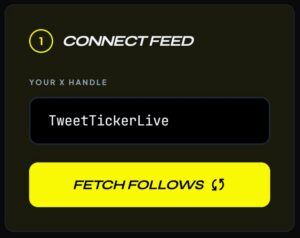
1. Connect Your Feed: Enter your X handle and click “Fetch Follows.” This pulls the list of accounts you already follow into the system so you can start filtering them.
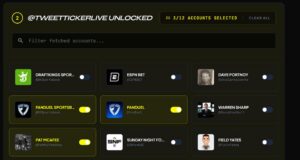
2. Select Your Sources: You will see a list of every account you follow. Simply toggle the switch next to the reporters or news wires you want to see. This keeps the noise off your screen and makes sure only the most important headlines scroll by.
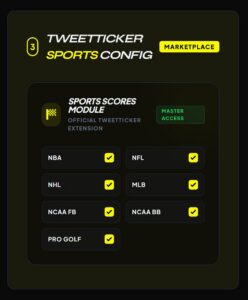
3. Configure Sports (Optional): If you have the Sports Score Module, you can check the boxes for the specific leagues you want to track, like the NFL, NBA, or NHL. This adds real-time scores and sports data to your feed.
4. Launch the Ticker: Once your selections are made, click the “Launch Ticker” button. Your live information stream will begin immediately. You can now copy the secure link and open it on your TV, tablet, or secondary monitor.
FAQ
How many screens can I run at once?
It depends on your plan. Pro users can run multiple tickers simultaneously, which is great for people who want one screen for finance and another for general breaking news. You can see our pricing for more details.
Is it safe to run a ticker on a public TV?
Yes. Since you use a share link instead of a direct login, your account stays secure. No one can mess with your settings or see your personal data just by looking at the TV.
Can I use this for my business or bar?
Absolutely. Many sports bars use tickers to show betting odds and analyst takes during games. It keeps customers engaged and creates a high-tech atmosphere.
Does it update automatically?
Yes. The system scans your selected accounts every few minutes for new posts. As soon as a reporter sends a post, it gets added to your ticker and scrolls across your screen.
How do I make it look professional?
Use dark mode and high-contrast text. This makes the headlines pop and projects a clean, useful look that fits in any office or workspace. If you need help with a custom layout, you can always contact us for assistance.
TT Staff
The TweetTicker Editorial Team provides real-time insights for high-velocity data environments.